
Mini UVDTF Tutorial: How to Use Transfers for Beginners
Table of Contents
- What You Need for Your First Mini UVDTF Transfer
- Step 1: Clean and Prep Your Surface
- Step 2: Peel and Position the Decal
- Step 3: Burnish and Remove the Transfer Film
- Best Surfaces for UV DTF and Where They Stick Best
- UV DTF Application Tips for a Smooth Finish
- Troubleshooting UV DTF Transfers: Fixing Bubbles and Peeling
- Conclusion: Start Your Mini UVDTF Project
- Frequently Asked Questions
Last Updated: September 4, 2026
UV DTF transfers look complicated, but the process is straightforward once you understand the peel, stick, and burnish sequence. This mini uvdtf tutorial for beginners breaks down each stage so you can apply your first decal with confidence.

UV DTF printing is a heat-free application method using a cold lamination process with a clear transfer film and a permanent adhesive layer. Your tools are simple: a clean surface, a squeegee or burnishing tool, and about five minutes of patience.
Below, we walk through the full mini uvdtf tutorial from surface prep to final peel, then cover the best surfaces for UV DTF and how to fix common errors.
What You Need for Your First Mini UVDTF Transfer
A mini uvdtf tutorial requires few supplies. The decal arrives as a small sheet with three layers: the backing paper, the printed adhesive decal, and a clear transfer film on top.

Gather these items before you start:
- Your mini UV DTF decal
- Isopropyl alcohol at 70% or higher
- A lint-free cloth or paper towel
- A squeegee, credit card, or rigid plastic scraper
- The item you are decorating
The squeegee is the one tool you should not skip. Your fingernail or a soft cloth will not generate enough pressure to force the adhesive into the microscopic pores of your substrate.
UV DTF application guidance from a leading craft supplier
Step 1: Clean and Prep Your Surface
Surface preparation is the difference between a decal that lasts for years and one that lifts off within weeks. Wipe the entire area with isopropyl alcohol, then dry it completely with a lint-free cloth.
Oils from your fingers, mold release agents, and fine dust sit between the adhesive and your substrate. When you burnish over these contaminants, you trap them under the decal, creating weak points where peeling starts.
Clean a larger area than you need. Positioning a 2-inch decal precisely is difficult, and you will likely touch the surface more than once while lining it up.
Step 2: Peel and Position the Decal
Peel the entire decal assembly off the backing paper slowly. Pulling quickly can separate the adhesive layer from the transfer film, ruining the decal.
Hold the decal by the edges of the clear transfer film. The adhesive side will grab the first thing it touches. Position the decal over your cleaned surface, then lower one edge first, angling it like a hinge to prevent trapped air.
For curved items like tumbler wraps or pen barrels, work from the center outward. Starting from one edge creates wrinkles that are nearly impossible to remove once the adhesive locks in.
Step 3: Burnish and Remove the Transfer Film
Burnishing is where most beginners rush, and it determines whether your decal develops a permanent bond or fails later. Start at the center and press the squeegee outward toward the edges in overlapping strokes.
Spend at least 30 seconds on a 2-inch decal. If you can feel the edges through the transfer film with your fingernail, you have not burnished enough.
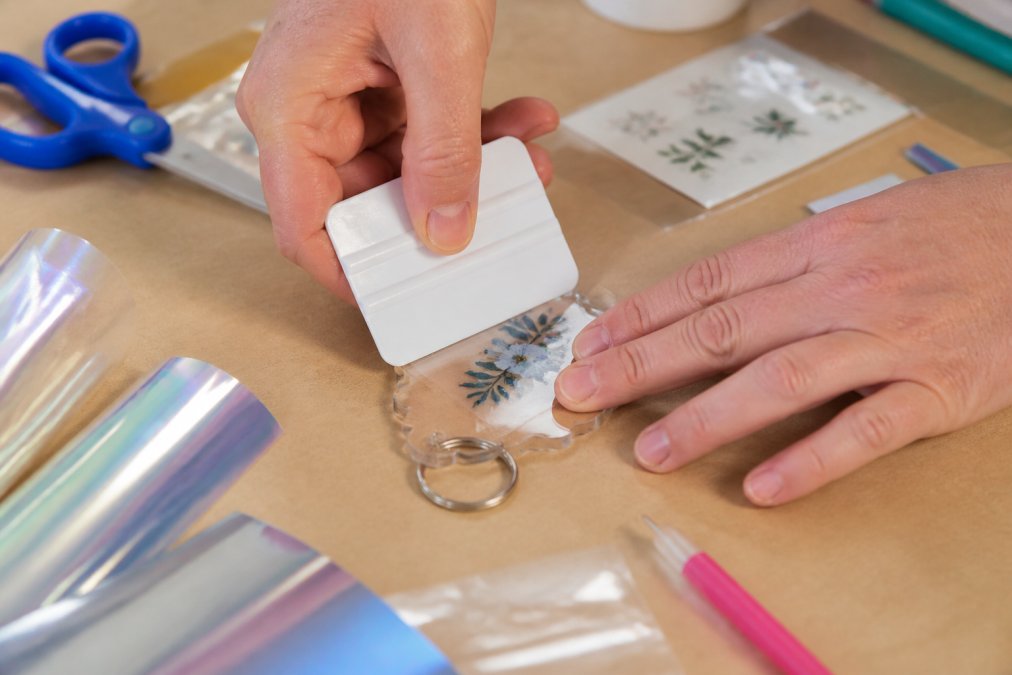
When the design looks uniformly bonded with no light spots or silver streaks, peel the transfer film away at a sharp angle, pulling it back over itself. If any part lifts with the film, lay it back down and burnish that section again.
Best Surfaces for UV DTF and Where They Stick Best
The best surfaces for UV DTF are smooth, non-porous substrates where the adhesive can form a complete seal. Acrylic hotel keychains are the most popular choice because the flat, glossy surface gives the adhesive maximum contact area.
Here is what long-term durability testing reveals about each common substrate:
Acrylic and hard plastics. These are the gold standard. The adhesive forms a mechanical bond with the microscopic surface texture, and because acrylic does not flex or outgas, the decal remains stable. A properly burnished decal on flat acrylic will survive many dishwasher cycles without edge lifting, provided the wash cycle does not exceed 140°F.
Glass and ceramic. These surfaces are smooth at the macro level but have a high surface energy that the adhesive bonds to well. The risk is thermal shock, which can show up as faint cloudiness after a few weeks. For tumblers that will see hot beverages, let the decal cure for 72 hours before first use.
Coated paper cups and cardstock. These are single-use surfaces. The adhesive bond is strong, but the substrate is not durable. Expect the decal to outlast the cup. Do not test these for dishwasher safety.
Metal tumblers and water bottles. The critical variable is the powder coating. Smooth, glossy powder coats are excellent. Textured or matte powder coats create micro-gaps under the adhesive, causing edge peeling. If you must apply to a textured metal surface, use a primer designed for low-surface-energy plastics and expect to replace the decal after some months of daily use.
Painted wood with a sealed finish. This works only if the seal is completely cured. Water-based polyurethane takes 30 days to reach full hardness. Applying a decal to a freshly sealed surface can cause the adhesive to bond to the uncured top layer, which will wrinkle or lift as it shrinks. Test with a fingernail: if you can leave a mark, it is not ready.
Surfaces to avoid entirely. Raw wood, uncoated ceramics, and textured fabrics are non-starters. The porous structure absorbs the adhesive unevenly, leaving micro-gaps that let moisture work under the decal. The failure is a slow peel that starts at the edges and spreads inward over 2-3 weeks.
The curved surface rule. For curved items, smaller decals perform better. A 2-inch design wraps around a standard pen barrel or tumbler with minimal distortion, while larger decals develop stress lines at the curve points. Stress creates a point where the adhesive is under tension, accelerating failure. If applying to a cylinder with a radius under 1 inch, keep the decal under 2 inches in the dimension that wraps around the curve.
Dishwasher and UV exposure testing. A standard home dishwasher cycle reaches 130-150°F and exposes the decal to high-pressure water jets and alkaline detergent (energy.gov). UV DTF adhesive is not rated for that environment. Decals on acrylic keychains may show softening edges and fading colors after repeated dishwasher cycles. The UV-resistant ink layer holds up well, decals on car windows retained full color after 6 months of daily sun exposure. Heat degrades the adhesive bond, so a decal on a car dashboard (which can reach 180°F in summer) may start to peel within 30 days.
The takeaway: Match the substrate to the use case. For daily handling and occasional washing, flat acrylic is your safest bet. For heat or harsh chemicals, plan for the decal to be temporary. Always test one sample on the exact material before committing to a production run.
UV DTF Application Tips for a Smooth Finish
The difference between a professional-looking result and a frustrating one often comes down to a few easy-to-overlook UV DTF application tips.
Curing time is non-negotiable. While UV DTF is heat-free, the adhesive does not reach full strength immediately. Let the decal sit for 24 hours before handling it aggressively. The adhesive continues to flow into the surface microstructure, creating the permanent bond. At 72 hours, the bond reaches approximately 90% of its ultimate strength. At 7 days, it is fully cured. If selling finished products, build that 24-hour minimum into your production timeline.
Work in a clean, dust-free area. A single pet hair or dust speck on the exposed adhesive creates a visible bump that no amount of burnishing will fix. If applying several decals, cover finished pieces with a clean cloth while you work on the next one.
Cost-per-unit analysis for selling finished goods. A single 2x2-inch UV DTF decal costs approximately $0.50 in small quantities. An acrylic keychain blank costs $0.30-$0.80. A split ring adds $0.05-$0.10. Total material cost is roughly $0.85-$1.40 per finished keychain. At a typical craft fair price of $5-$8, your gross margin is 70-80% before labor. Each keychain takes 3-5 minutes of active work. At $15/hour labor, that adds $0.75-$1.25 per unit. Your true cost is $1.60-$2.65 per keychain, still leaving a healthy margin at $5 retail. For tumblers, a 20-ounce stainless steel blank costs $4-$7. A 3x4-inch UV DTF decal costs $1.50-$2.50. Material cost is $5.50-$9.50 before labor. At a typical retail price of $20-$25, your margin is still strong, but your upfront investment per unit is higher.
File preparation technical specs for custom designs. Design at 300 DPI minimum. Work in CMYK color mode, not RGB. Set your transparency correctly. UV DTF printing uses a white ink layer as an underbase for opaque designs. If you want a transparent design that lets the substrate color show through, you must explicitly set the background to transparent. If you leave a white background, the printer will lay down a white underbase, and your decal will have a visible white border on dark surfaces. For text, keep it above 8 points at 300 DPI.
For dark-colored surfaces, check the opacity of your decal before applying. A transparent design on a black tumbler will look different than on a white keychain. If designing for dark substrates, always include a white underbase layer. If buying pre-made decals, check the product description for whether it includes a white layer.
Environmental conditions matter. UV DTF adhesive performs best between 65°F and 85°F. Below 60°F, the adhesive becomes stiff and does not flow into the surface microstructure as effectively. Above 90°F, the adhesive becomes tacky and can leave residue on the transfer film when peeled. If working in a cold garage, warm the decal and substrate with a hair dryer on low for 10-15 seconds before application.
A note on storage. Unused UV DTF decals have a shelf life. Store them flat in a cool, dry place away from direct sunlight. Heat and humidity degrade the adhesive over time. If decals have been sitting for more than a few months, test one on a scrap surface before applying it to your final product.
Troubleshooting UV DTF Transfers: Fixing Bubbles and Peeling
Even with careful technique, troubleshooting UV DTF transfers becomes necessary at some point.
Bubbles under the decal. Small air bubbles that appear immediately after application can often be pushed to the nearest edge with your squeegee. If the bubble does not move, the adhesive has already sealed around it. Pierce the bubble with a pin through the transfer film before you peel it, press the air out, and burnish the spot flat.
Peeling edges after application. This almost always traces back to insufficient burnishing or a contaminated surface. If caught within the first hour, press the edge back down and burnish firmly. Beyond that, the decal needs to be replaced.
Decal lifts with the transfer film. This means the adhesive did not bond to the substrate. Remove the decal, re-clean the surface with isopropyl alcohol, and try again with a fresh decal. Reusing a lifted decal rarely works because the adhesive picks up debris during the failed application.
| Common Problem | Likely Cause | Fix |
|---|---|---|
| Bubbles under decal | Trapped air during positioning | Push to edge with squeegee or pierce and press out |
| Edges peeling | Insufficient burnishing or dirty surface | Press down within first hour or replace decal |
| Decal lifts with film | Adhesive did not bond | Clean surface, use fresh decal |
| Wrinkles on curved items | Starting from the wrong edge | Work from center outward on cylinders |
For crafters who want to build custom designs, adhesive application best practices from 3M offer useful technical detail on how pressure and surface energy affect bond strength.
Conclusion: Start Your Mini UVDTF Project
The learning curve for UV DTF is shorter than most crafters expect. Clean the surface properly, burnish with real pressure, and let the adhesive cure, and your decals will hold up through daily handling.
When you are ready to start, Barkers Creative Designs carries individual mini UVDTF decals in faith-based and inspirational designs at $0.50 each, sized at 2 inches by 2 inches and larger. Browse our selection and search for the design that fits your next keychain, pen, or tumbler project.

Frequently Asked Questions
Do I need a heat press for mini UVDTF transfers?
No, you do not need a heat press. Mini UVDTF transfers are designed for cold application. The adhesive layer activates with firm pressure from a squeegee or your thumb. This makes them ideal for beginners and for materials like acrylic that might not tolerate heat well. Just ensure the surface is clean and dry before you press the decal into place.
How long do mini UVDTF transfers last on craft blanks?
When applied to a clean, smooth surface and properly burnished, a UVDTF decal forms a permanent bond. It is durable enough for everyday handling on items like keychains and pens. For best longevity, avoid harsh abrasives and prolonged soaking in water. The ink is cured during manufacturing, so it resists fading and scratching better than standard vinyl.
Can mini UVDTF transfers be used on curved surfaces?
Yes, but with some care. The 2x2 inch size of mini UVDTF decals works well on gentle curves like those found on pens or tumblers. The key is to apply pressure from the center outward to help the film conform to the curve and avoid wrinkles. Very tight curves or textured surfaces are harder to do without bubbles or lifting.
What are the most common mistakes when applying UV DTF?
The most frequent error is skipping surface preparation. Dust or oils prevent the adhesive from bonding, leading to peeling later. Another common mistake is not burnishing the decal thoroughly before peeling off the transfer film, which leaves air bubbles and weak spots. Take your time to press the entire design firmly to ensure full ink adhesion.
This article was written using GrandRanker